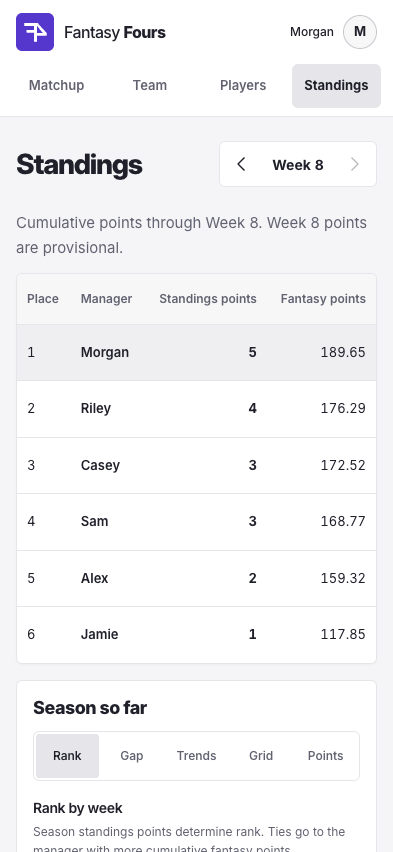
Local light-mode rehearsals show the Week 9 draft and sample standings through Week 8, which is provisional.
See where you are in the draft
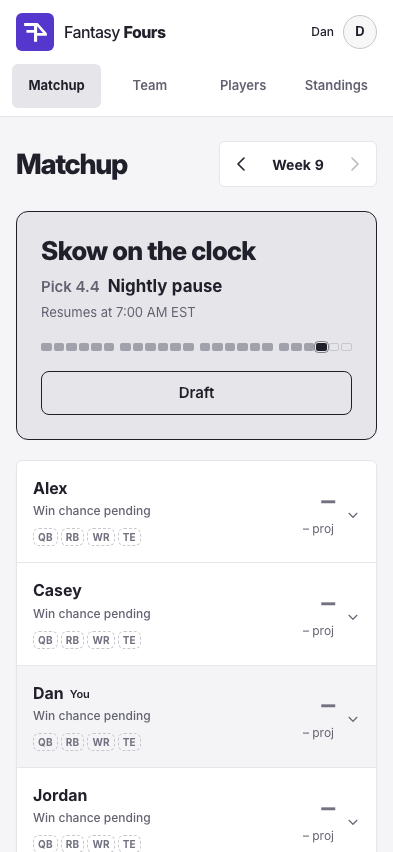
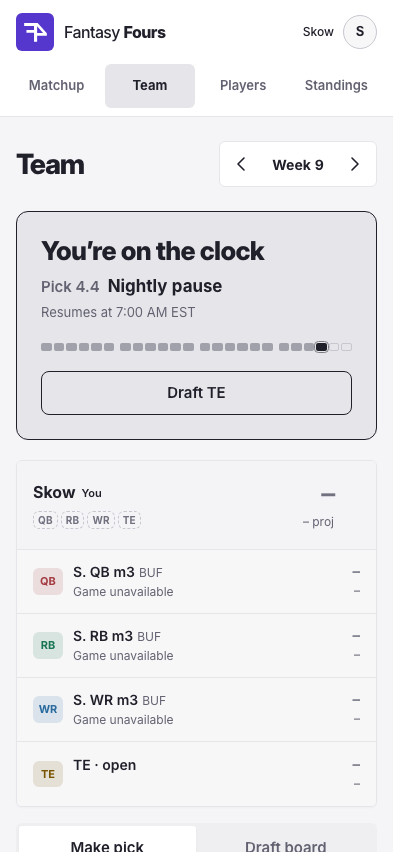
Matchup and Team highlight the current pick in a four-round progress bar. The clock and current slot turn red with less than ten minutes left. During the nightly pause, the card shows when the clock resumes. Open Draft on Matchup to go straight to the board, or use Team to make your pick or edit your queue.
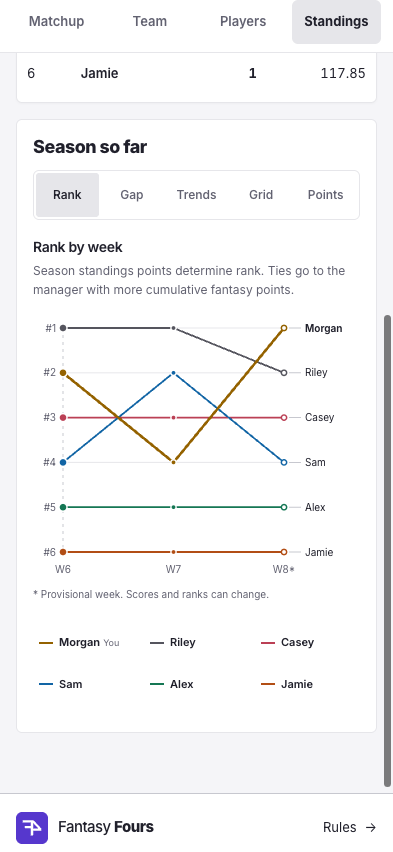
See where the standings changed
Follow each manager’s rank, standings-point total, and gap to the lead through the selected week. Compare weekly fantasy scores against the league average in Trends, or read the scores side by side in Grid. Select a week for details. An asterisk marks provisional results.
Look back at the standings
Choose a week in Standings to see each manager’s rank, standings points, and fantasy points through that week. The table marks the selected week’s points as provisional while scores are being finalized.
Keep league information within easy reach
The phone footer puts the Fantasy Fours logo and Rules link on one compact row. Expand Score updates to check refresh times, or open the league activity log when you need the details.
Improvements
The draft board names the position that set the week’s order. Pregame lineups align at the left until ranks are available.
Draft alerts show the same pick number as the board, such as 2.2 for the second pick in round two. The deadline uses your device’s time zone and includes the date when it falls on another day.
Shorter sign-in, Profile, draft, and chart copy keeps actions and league data easier to scan. Repeated headings, footer descriptions, and internal queue revision numbers have been removed.
Notification setup skips installation steps when Fours is already installed.
Tighter footer spacing reduces scrolling while keeping comfortable tap targets.
Fixes
Each interception thrown costs two fantasy points. Weekly scores and standings use the corrected rule from the start of the pilot.
A clearer view of your league
Actual app views from a local light-mode rehearsal snapshot. Example scores and pending data illustrate the layout. The earlier chart rehearsal shows five-minute averages and compressed idle periods.
Read the scores at a glance
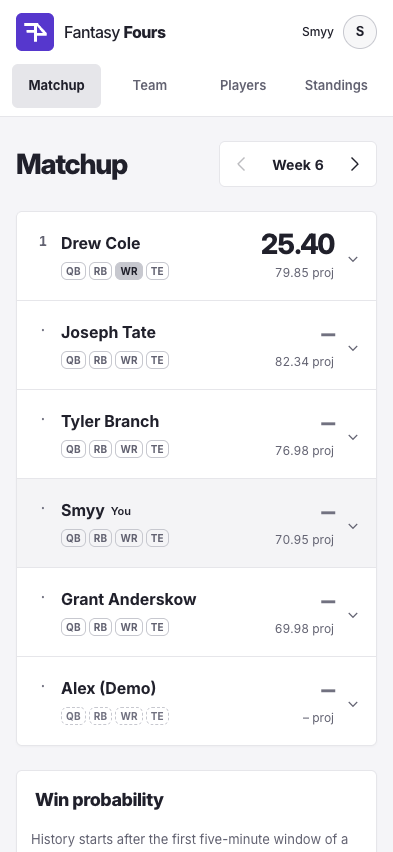
Larger totals and roomier player rows make Matchup easier to scan. Your lineup has a subtle highlight and a You label. Pregame projections are labelled beneath team scores, and desktop lineups align names, game details, and points across the table.
A consistent look across the league
The refreshed header follows your light or dark appearance choice. The logo keeps its purple while a neutral palette handles selected tabs, buttons, links, and your own lineup. A filled tab identifies your section, and softer panels, larger supporting text, and consistent spacing carry through Team, Players, the draft board, and Standings.
Follow five-minute averages
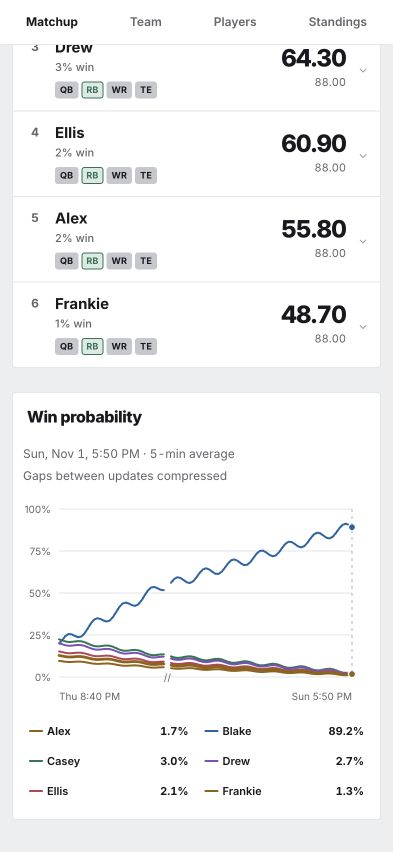
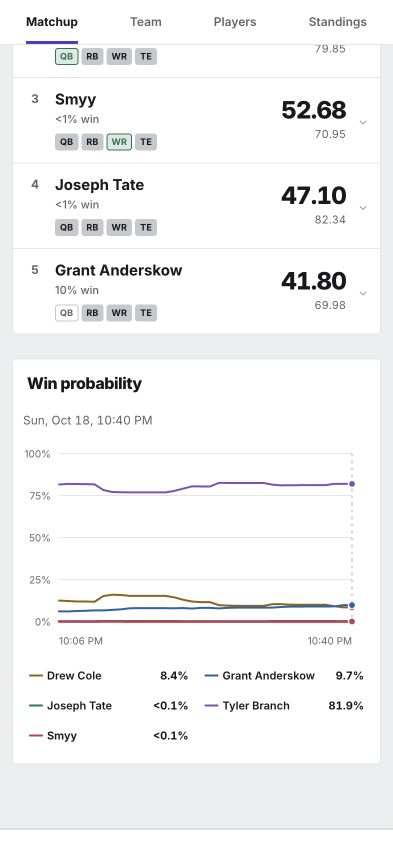
The win probability chart now shows one average for each completed five-minute window, using the available one-minute readings. Labels and hover details identify the average and the end of its window. Scores and underlying win estimates continue to update every minute during play.
Improvements
Your Google account photo appears in the header and on Profile, with your initial as a fallback when the photo is unavailable.
Links inside sentences are underlined so they stay easy to spot in both themes.
Idle time between games collapses into small marked breaks, giving the recorded action more room.
Corrected readings flow through to their five-minute averages.
Phone player filters give positions a full row and availability its own row below. Primary controls and position buttons have more room to tap.
Team gives the current draft status and countdown stronger emphasis, with a clearer selector for your team and the draft board.
Players has a distinct search icon in desktop navigation. Wide research tables continue to scroll within their own area.
Fixes
The time axis follows recorded game updates and compresses idle periods between games.
Missing estimates preserve breaks in the chart.
The desktop total column reads Points before scoring begins, with a separate pregame projection label.
Snake drafts and a clearer mobile draft
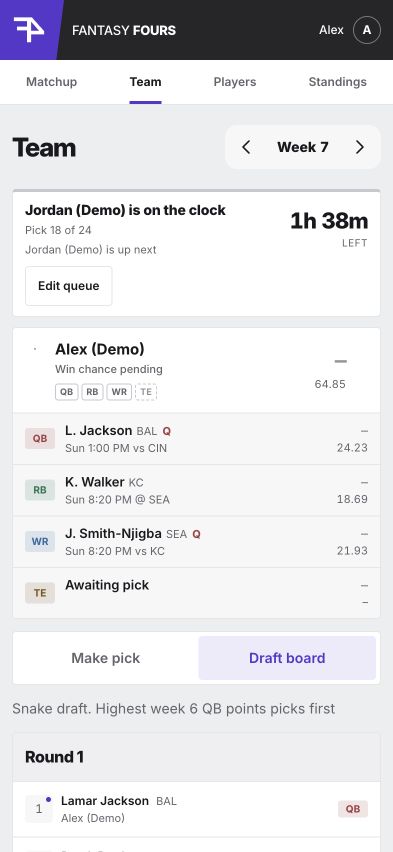
Draft status and your roster stay above the selected Draft board tab. Local light-mode rehearsal with demo managers and selections.
Get draft notifications on your phone
On phones, a one-time welcome popup walks you through adding Fours to your Home Screen and setting up draft notifications. Open notification settings directly from the popup, enable alerts for your device, and send a test. Your pick alerts run from 7 a.m. to 11 p.m. Eastern. The popup stays dismissed on later visits in the same browser.
Switch between making a pick and following the board
Switch between Make pick and Draft board while keeping your Team heading, selected week, draft status, and roster in place above the selector. The board has live updates and keeps your search and position filters ready when you return to making a pick. The links stay visible as you scroll on phones. Browse completed drafts by week, or see when an upcoming board is waiting for its order.
Follow each turn at a glance
The draft board gives each round a larger header and marks the active pick with an outline and On the clock badge. Your picks carry a small dot beside the pick number. Open slots show the manager, and completed picks put the player and NFL team above the manager. The status card names who is up next. Its countdown turns orange below 45 minutes, red below 30, and flashes red below 10; reduced-motion settings keep it steady.
Compare players with the game in view
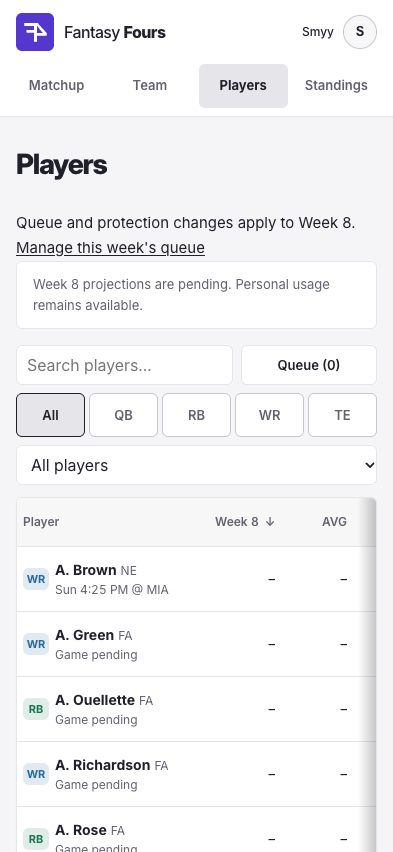
Compare weekly projections, average points, season totals, and position rank on Players. The sortable AVG column uses season points divided by games played, excluding byes and missed games. A narrower player column on phones keeps abbreviated names readable alongside position badges, NFL teams, kickoff times, and opponents. Scroll right for more statistics and queue controls; an edge shadow shows when more columns are available.
A new order every week
From NFL Week 7, six managers make 24 picks in a snake draft, reversing the order in rounds two and four. The opening order uses the previous week’s points at one position, highest first: QB for Week 7, then RB, WR, TE, and back to QB. Ties use a random draw saved when the draft opens.
A clean start for the sixth manager
The commissioner can approve a sixth manager after the Week 6 draft finishes and before Week 7 opens. Their Week 6 history shows four empty slots, zero fantasy points, and zero standings points. The original picks and awards stay intact, including through later score corrections.
See when first place is out of reach
A finished team trailing another finished team now shows 0% win. Win chances and their history update when final scores arrive, including between Sunday and Monday games, and reflect later score corrections.
Improvements
The welcome and sign-in pages now share a compact layout with Google sign-in and a clear commissioner approval requirement.
Tap the profile control on phones to open Settings, theme options, and Commissioner tools when eligible. Tap again or outside the menu to close it.
The mobile draft status keeps the current pick and countdown visible with less timing copy. Scheduled drafts use a simpler opening message.
Player game details follow the same week as the projection column, including when a completed draft advances research to the following week.
The desktop draft board shows all six picks in each round on one row and identifies the position used to set that week’s snake order.
The rulebook explains the rotating position order, tied scores, and sixth-manager admission.
The rulebook explains updates at game completion and how finished teams are eliminated from first place.
Fixes
Unavailable players stay in your queue as you scroll, keeping their status labels clear of the mobile header.
Returning from Draft board refreshes position filters when a pick fills one of your open slots. Links beyond the next available draft now show a clear unavailable page.
Completed player scores now verify against the correct athletes, allowing weekly results to settle and the next draft to open. Missing player identities are checked against roster details and game participation.
Players keeps current-week projections through the end of the league draft, then switches to the following week. The Week N column heading identifies the week being compared and updates automatically when the draft completes.
Restored live player scores and game clocks after an interruption to automatic updates.
Final scores replace the last in-game probability even when every remaining player is waiting for a later kickoff.
Finished teams with a higher-scoring finished opponent show 0% win. Small simulated chances continue to show <1% when an outcome remains possible.
Introducing Fantasy Fours
Matchup at mobile width in light mode, captured from a local league snapshot. The chart follows each team’s estimated chance of finishing first over time.
Follow your chance of winning
Matchup now shows each team’s estimated chance of finishing first as scores and game time change. A favorite above 50.1% stands out in bold gold with a continuous rumble and sparks. Pregame projections remain alongside the scores. The win probability chart tracks all five teams through the week. Inspect a time to compare their chances, highlight a team, and follow your own line at a glance. History begins with the first available estimate during a rostered game. Win chances update while a rostered game is active and hold steady between games, including after a page refresh. Win chances are experimental and include ties for first.
Compare the season before your next pick
Players brings next week’s projected points, total season fantasy points, and position rank into a sortable research table, starting with the highest projections. Short player names and consistent column headers make comparisons easier, and BYE identifies players whose teams have the week off. Season totals use Fours scoring across the full NFL regular season, with daily refreshes. Search, position filters, and All players, Available, and Drafted views help you compare options. Players stays on the current week for eligibility, while Team’s next-week view keeps the compact draft table and your private queue together.
Follow your team and plan the next draft
Team shows your lineup with the same actual and projected score format as Matchup, followed by a full-width draft board. The week selector moves between past teams, the current week, and next week’s preparation. Every draft round stays expanded. On phones, rows show the player and NFL team above the manager; desktop puts the NFL team below the player name. Next week’s player table fills the page, with a Queue toggle beside search to open your private draft order.
Follow the game beside every score
Each player’s game line switches from kickoff time to the current quarter and clock, halftime, or final, with the opponent always alongside it. Players start at 0.00 when their game begins. Injury designations have their own space on desktop and refresh ten minutes before kickoff, with retries and continued updates during live games.
Follow scores every minute
Player scores and team totals refresh every minute during live games and while results are incomplete. The league footer shows the last update and next refresh, so you can see when the latest scores arrived. Completed results continue to receive daily correction checks.
Meet the league before signing in
The welcome page explains the weekly four-player format, commissioner-approved membership, and how Google sign-in identifies your account. Visitors can learn about the app and contact its creator directly from the homepage. Returning members open Team while they have picks remaining in an active draft, then Matchup once their lineup is complete.
Make every pick count
Fantasy Fours brings five friends into a weekly NFL fantasy league with a season-long decision behind every pick. Draft one quarterback, running back, wide receiver, and tight end each week. Each manager can use an NFL player once during the 2026 pilot, from Week 6 through Week 17. Full PPR scores decide the weekly finish, and the top three earn 3, 2, and 1 standings points, with ties sharing the points for their places.
Read the league at a glance
Matchup is now a scoreboard stack: one row per team with its rank, name, four QB, RB, WR, and TE chips that show who is yet to play, playing, or done, and the team total over its projection. On your phone, tap a team to open its four players; on desktop every lineup is laid out in one table with totals at the right. Before kickoff a dash stands in for the total and the projection sits underneath, so a projection is never mistaken for points. Teams earn a rank digit only once they have a score, and places with standings points take over when every game is final.
Follow the week as it unfolds
An active draft takes the lead on Matchup with the current manager, pick clock, round, and a direct way into the draft. Preparation and results get a compact status as the week progresses. Weeks turn over Tuesday at 4 a.m. Eastern, with drafts opening at 7 a.m. Matchup, Team, and Standings share arrow controls and a week menu for moving through available weeks.
Plan this week and the next
Team opens directly into your current draft with your next pick number and the number of selections ahead of you. Players has a dedicated home for season research and personal usage, while next-week Team handles draft preparation, including before schedules and projections arrive. Standings focuses on the season rankings, with weekly scores available on Matchup. Keep an ordered queue beside the draft board and protect players you want to save for later. An autopick preview shows who would be selected if your turn expires. Each pick gets two active hours, with the clock running from 7 a.m. to 11 p.m. Eastern.
Keep the draft moving
Matchup and Team load faster, and live draft updates load less data as picks and queues change. Your search, filters, and open player details stay in place. Once a draft opens with a validated schedule, picks and autopicks continue using its saved kickoff times when a schedule refresh is delayed. Players still lock at kickoff, and missing schedule information keeps the draft on hold for commissioner review.
Improvements
The rulebook explains win probability step by step, including the 10,000 simulations, a halftime scoring example, positional uncertainty, shared game effects, ties, and model limitations.
Move between league pages with smaller page loads. Players loads its table first and fetches detailed game information when you open a player. Completed Team views load just the drafted players, and navigation gives immediate loading feedback.
Win probabilities calculate more efficiently while preserving the same simulation results. Player search and filters avoid repeated work during live clock updates.
Win probability history loads in compact snapshots and receives small live updates, keeping long weeks responsive on phones.
Commissioners can edit league members’ display names directly from Commissioner tools. Changes appear throughout the league and are recorded with a reason; members can still update their own names in Profile.
Team puts the clock, your turn, and your next pick first, with the deadline and overnight pause spelled out and an upper bound on when your next turn can arrive.
The draft pool shows one compact row per player with the game line, projection, and a single Draft or Queue action; dated injury and projection sources live in player details.
Team and Matchup share the same lineup score display, with actual points above projections and open positions linked to the draft pool.
Players puts Queue beside search and availability beside position filters. NFL teams sit beside player names, and Used Week tags identify previous selections with colors suited to each theme. Previously used players have a lighter gray row on Players and next-week Team.
Matchup, Team, and Standings share the same week selector, with arrows and a menu that opens below its button and supports keyboard navigation.
Live player scores refresh every minute, with the next refresh time shown in the league footer.
Inter typography gives navigation, player names, and scores a consistent appearance across devices.
Learn about the private league and its creator from a public welcome page before signing in.
Follow an active draft from Matchup with whose turn it is, time remaining, and pick progress.
Compare team rows ordered by actual points, then projected points, highest first.
Next-week Team starts with All selected so you can browse every position before narrowing the pool.
Compare stacked player scores and projections, with team totals side by side and fewer repeated labels.
Compare lineups beneath shared, color-coded QB, RB, WR, and TE headers, with full player names available in details.
Scan one compact row per team, then tap it on your phone to see the four players; nothing scrolls sideways.
Each player cell lines up name beside score and game progress beside projection, with injury codes such as Q or O next to the NFL team on phones and the full designation on desktop.
Long names such as Jaxon Smith-Njigba read as JSN in the desktop table, with the full name on hover and in player details.
Panels and controls use a tighter 4px corner radius throughout the app.
Use four stable destinations: Matchup, Team, Players, and Standings. Existing bookmarks and selected weeks keep working.
See your next pick and picks ahead, with confirmation after each selection.
Compare unused players on Players and prepare next week’s queue from Team, even before the weekly pool is imported.
Four labelled position chips track each lineup in QB, RB, WR, TE order: outlined before kickoff, green while playing, and filled when finished.
Standings keeps the season table in focus, with repeated subheadings, the weekly results table, and the next draft order removed.
Click or tap your avatar to open Settings, your existing profile page. Hover on desktop or use the menu button beside your avatar for Light/Dark options and Commissioner tools when eligible.
Use the dark scoreboard theme or save a light-mode preference.
Find the rulebook and score-update information in the league footer.
Fixes
The live updates warning appears only after an hour without a successful refresh and clears as soon as updates resume.
Win probability calculations pause when every rostered game is inactive. Team labels and the chart use the same saved estimate, keeping chances steady between games and through reloads.
Players marks bye weeks with BYE while preserving the dash for other missing projections. The redundant player count below the heading is removed.
Players ends at the table, with source notes, the all-manager usage section, the league footer, and the week in the browser title removed.
Team no longer shows a disabled Draft button on every player when it is not your turn, and View matchup buttons are gone from Team since Matchup is one tap away in the navigation.
Completed lineups appear directly above the draft board with fewer repeated status labels.
Player usage-week labels refresh as picks arrive without requiring a page reload.
Live game information and injury designations stay on separate lines, preventing overlapping labels on desktop.
Cleared injury designations update after drafting finishes. Missing or older provider reports preserve the last known status.
Page navigation keeps the main content free of stray focus outlines while keyboard controls retain visible focus indicators.
Visitors reach the welcome page directly from the homepage, while existing league bookmarks keep their destinations.
Current-week views roll over Tuesday at 4 a.m. Eastern, including daylight saving changes.
Links to future matchups return to the current week.
Provisional weekly places no longer appear on Matchup after the first Thursday score; places and standings points wait until every game is final.
Hovering a team row on a mouse highlights the whole row rather than only the team name.
Quick week changes keep the latest selection and wait for that week’s data before allowing edits.
Closing player details restores focus to the player you opened and preserves your search.
Resuming a paused draft preserves the remaining turn time while using the validated kickoff schedule.
Weekly history begins Oct 13, 2026. Weeks run Monday through Sunday. Historical dates follow commits on main in Eastern time.