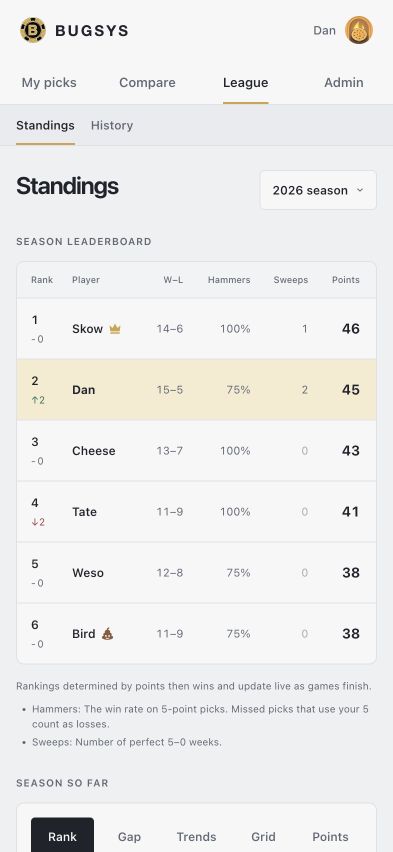
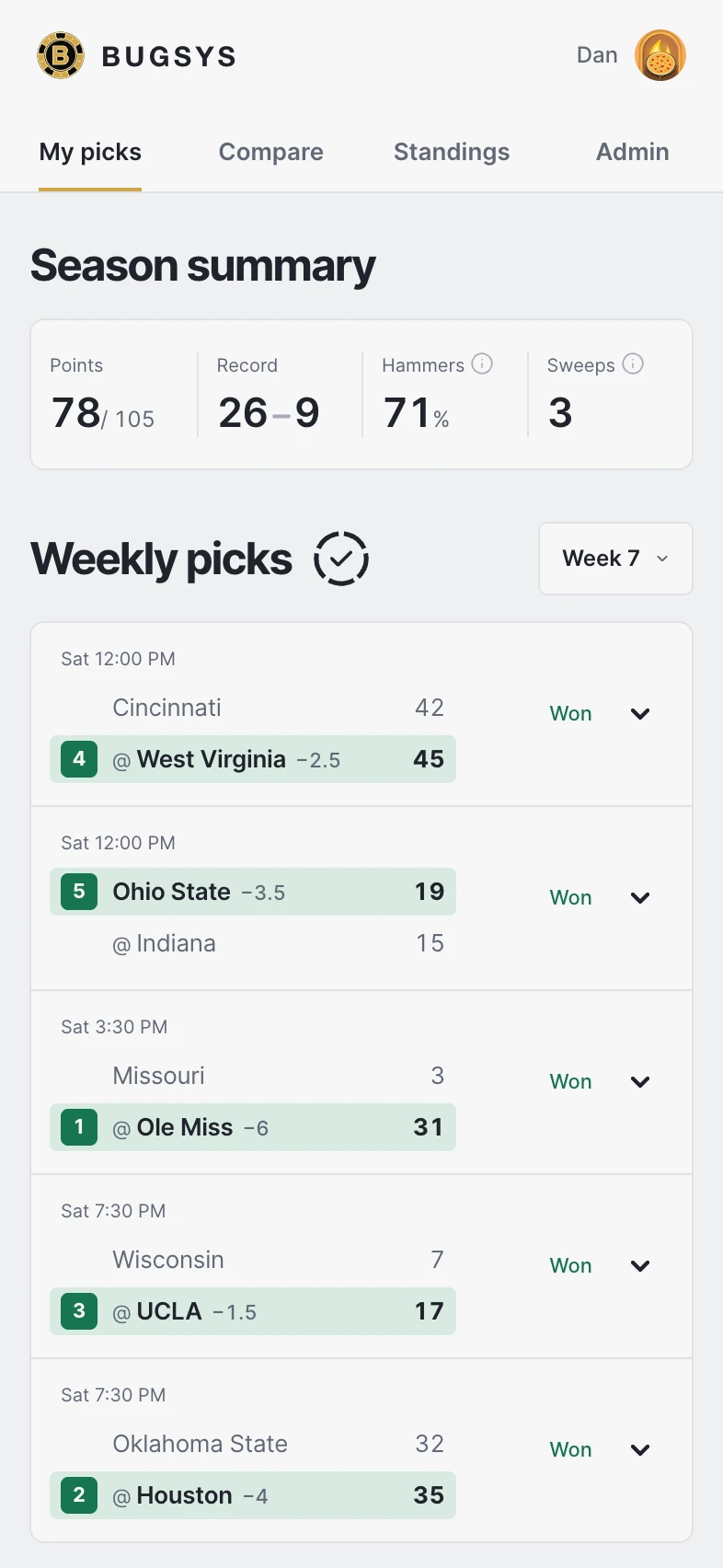
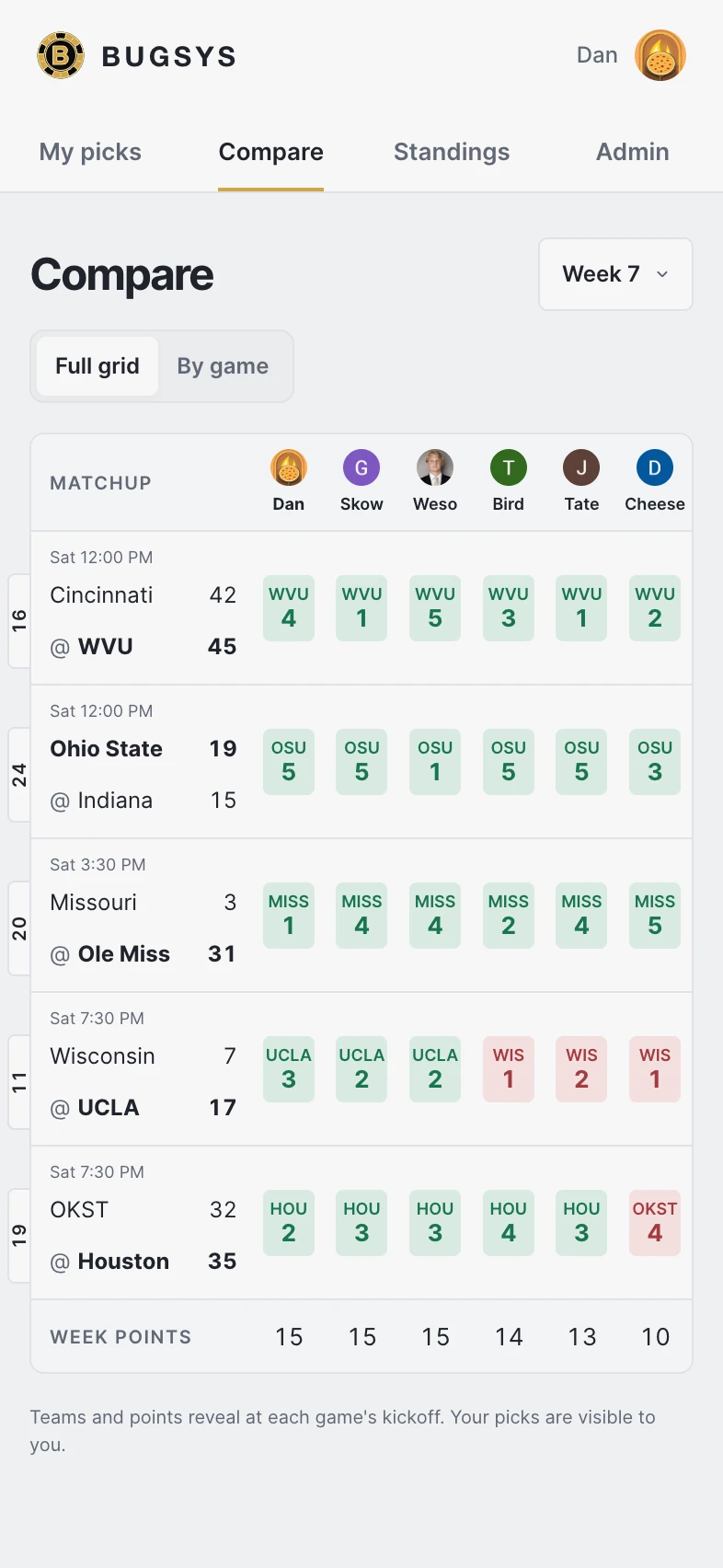
Starting 2½ hours after kickoff, Bugsys checks the scoreboard every minute and grades picks when the score feed confirms a final. Your points, record, and place in the standings update as each result arrives. Commissioner-entered results remain protected.
Keep the league open as you watch
My picks, Compare, and Standings check for new results while the page is visible and update automatically when scores change. Returning to the app checks for changes immediately, so you can follow the pool throughout the day.
Fixes
Automatic grading now runs on a minute schedule with a backup score source and retries for temporary provider failures.
The schools you trust and the records you own
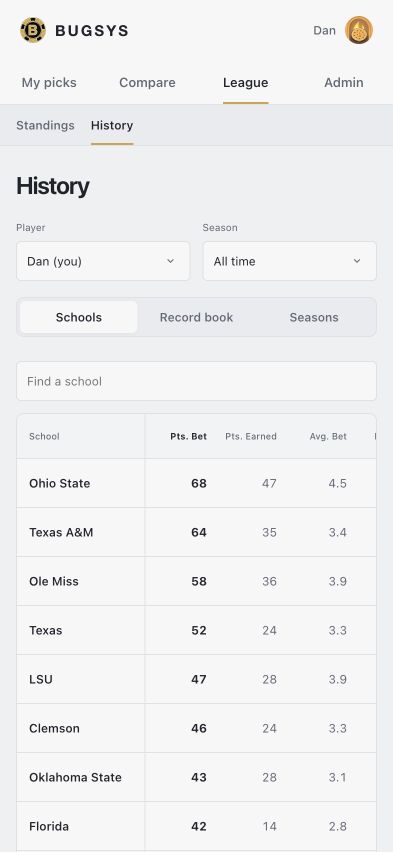
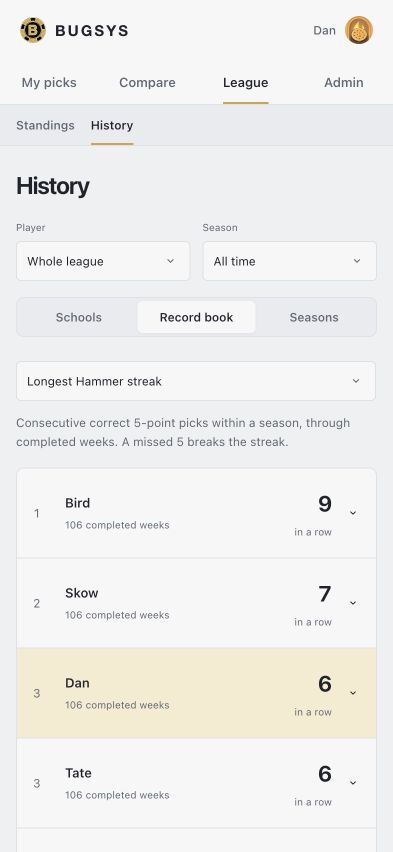
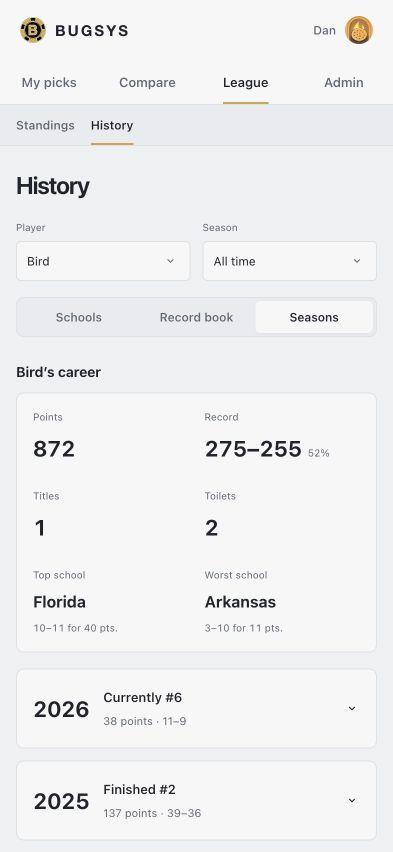
History in a local preview using the league’s recorded seasons, captured November 1, 2026 at 393×852 in light mode with Hide melons enabled.
Follow your confidence through the years
History opens with Schools, where you can see which teams receive the most picks and confidence points from you or the whole league. Compare average confidence, 5-point picks, points earned and lost, and win rates across all recorded years or a single season. Pick frequency accounts for how often a school appeared in your recorded games. Open a school to see who backed it and revisit every settled pick.
Give memorable Saturdays a permanent home
The record book recognizes weekly wins, sweeps, lone wolf wins, Hammer streaks, five-week scoring runs, dominant weeks, upset calls, and title comebacks. Weeks at No. 1 and points above the field put sustained performance in context. Each category explains its calculation, and qualifying moments link to the original season and week.
Revisit every championship race
Seasons brings champions, winning margins, final standings, and individual career finishes together. Championship awards wait for completed seasons, tied finishes share credit, and points per week makes seasons of different lengths easier to compare. Player names in All Time standings and season archives open career pages with points, records, titles, last-place finishes, and top and worst schools. Worst school balances repeated losses with pick volume. Historical pick links preserve the selected year as you move between weeks.
Improvements
Hold Shift while clicking names in the Season so far chart legend to compare multiple players. Shift-click again to remove a player; a regular click highlights one player.
League navigation brings Standings and History together. A shared background connects League to its submenu on phones, and a single group contains the parent and nested links in the desktop sidebar. The submenu opens smoothly as you enter League. Search schools in a compact table with a pinned school column. Click any heading to sort in either direction, with the selected column shown in bold.
Player and season filters stay in the URL for sharing, reloading, and browser Back.
Weeks in slate on the Schools tab shows how many published weekly slates featured each school in the selected seasons, giving pick and confidence totals more context.
History uses settled results and recalculates when results are corrected. Reading past picks preserves the imported records.
Fixes
Opening a player from a past season’s standings now keeps that season selected.
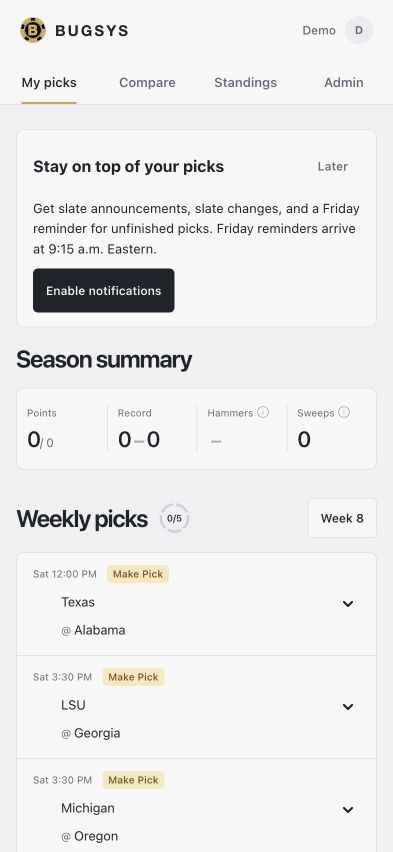
Stay on top of your picks
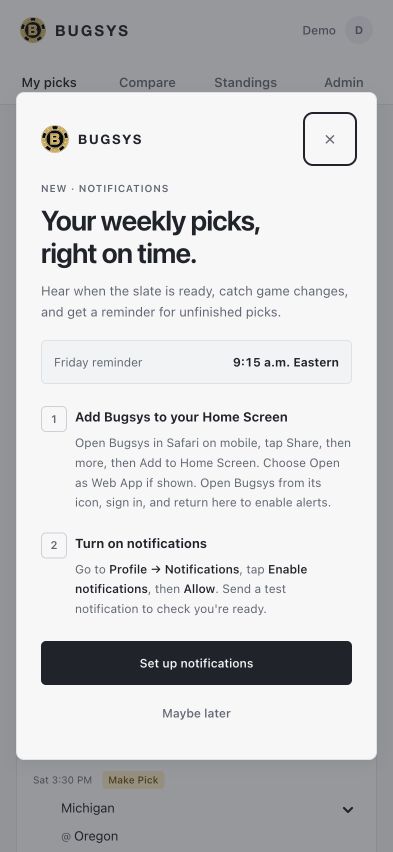
Notification setup on My picks and the one-time welcome, shown with a demo account and sample games in a local light-mode rehearsal at iPhone 15 Pro dimensions. Hide melons is enabled.
Know when the slate is ready
Enable notifications on your device to hear when the commissioner publishes the weekly slate or changes its games. Each alert takes you straight to that week’s picks so you can review the slate and make your selections.
A Friday reminder before the weekend
At 9:15 a.m. Eastern on Friday, Bugsys checks for unfinished picks and sends a reminder if you still have an open game to choose. Completing your remaining picks clears a queued reminder, and games that have already locked or been voided are excluded.
Choose alerts for each device
On phones, a one-time welcome explains how to add Bugsys to your Home Screen and turn on alerts, with a direct link to notification settings. My picks offers a quick setup prompt, and Profile has controls to enable, test, or turn off notifications. Commissioners can review delivery status and pause league notifications from Profile.
Improvements
Notification links preserve the selected week through sign-in.
Signing out disables notifications for that device.
Fixes
Admin now keeps the current week selected after publishing a slate. Its default advances with the rest of the app on Monday at 5 a.m. Eastern, and commissioners can still use the week selector to prepare a future slate or review an earlier week.
Dark mode for game night
My picks, Compare, and Standings in light mode, captured October 18, 2026 with Hide melons enabled.
Follow the league after dark
Bugsys now has a dark appearance across your picks, Compare, Standings, player details, and commissioner tools. Softer surfaces make evening check-ins more comfortable, while wins, losses, and each player’s chart colors stay easy to follow. Brighter yellow highlights make your own row in Standings easier to spot.
Choose the appearance that suits you
Click or tap your avatar to open Settings, your existing profile page with Light, Dark, and System buttons. Your avatar sits at the bottom of the desktop sidebar and at the top right on mobile. Hover on desktop for the menu and Light/Dark theme options. Bugsys follows your device by default, and System adjusts whenever your device appearance changes. Your choice stays saved on this device, carries across pages and reloads, and updates your other open Bugsys tabs.
Fixes
Corrected a hosting route that sent requests across continents before reaching the league database, adding delays when opening Admin, Standings, and Compare.
Standings stays within the page on small phones, with All Time’s extra columns scrolling inside the table.
All-time standings and new ways to follow the season
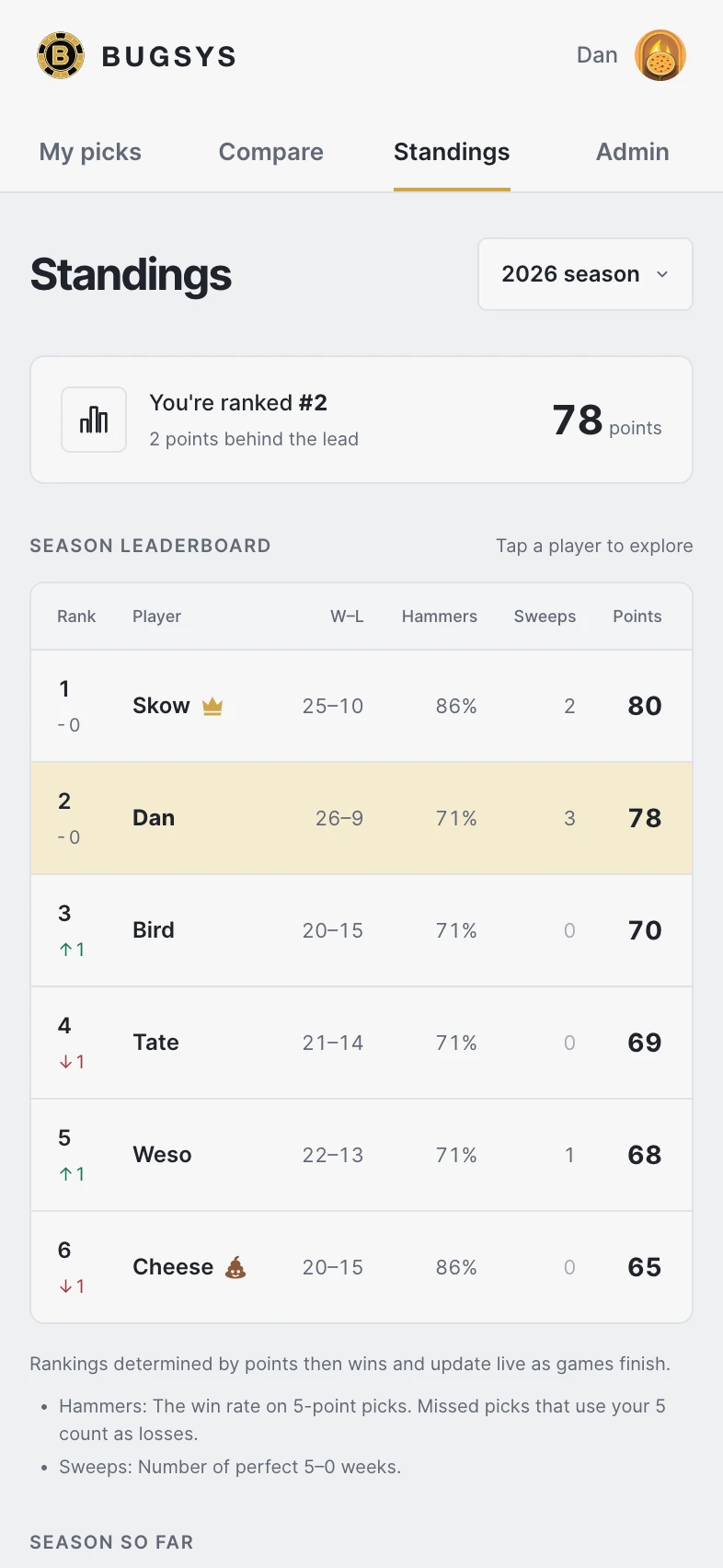
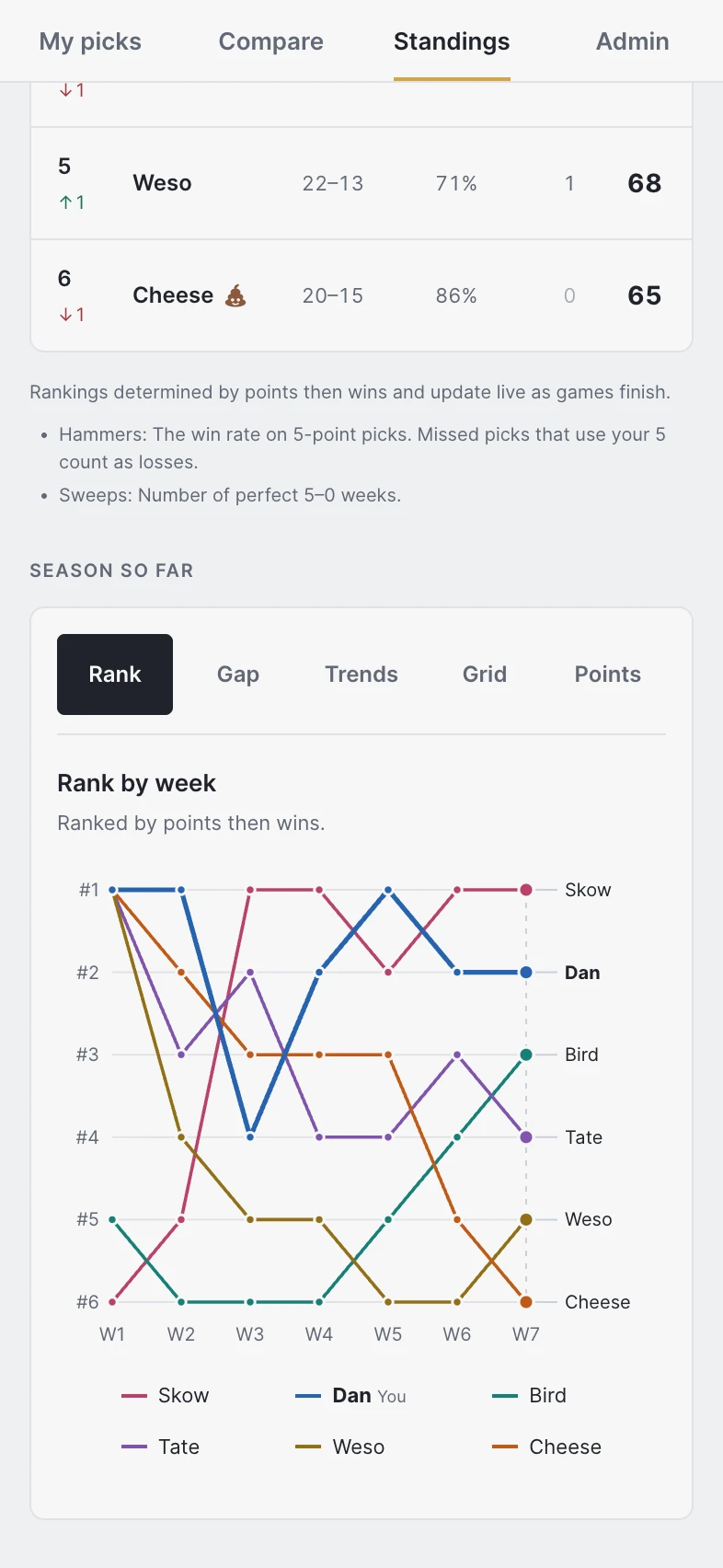
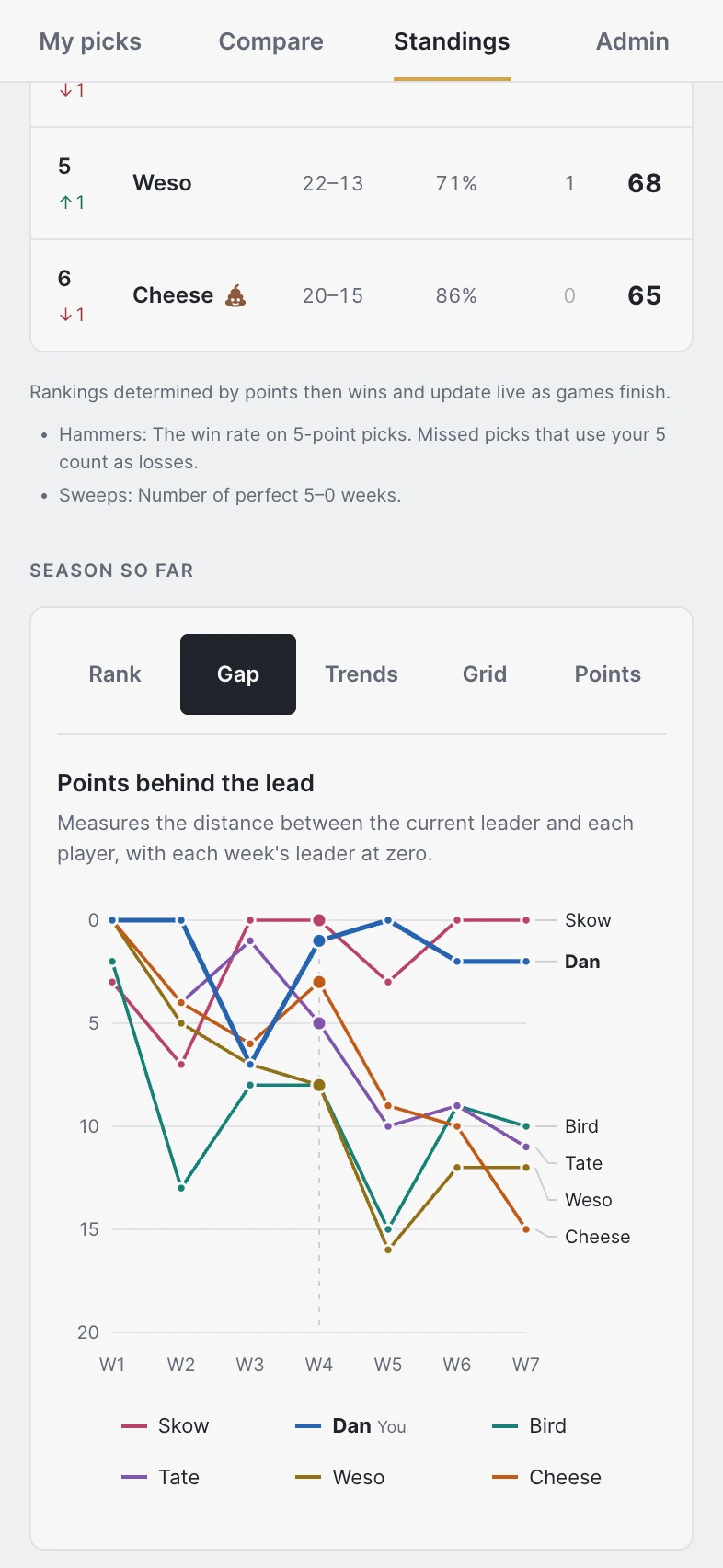
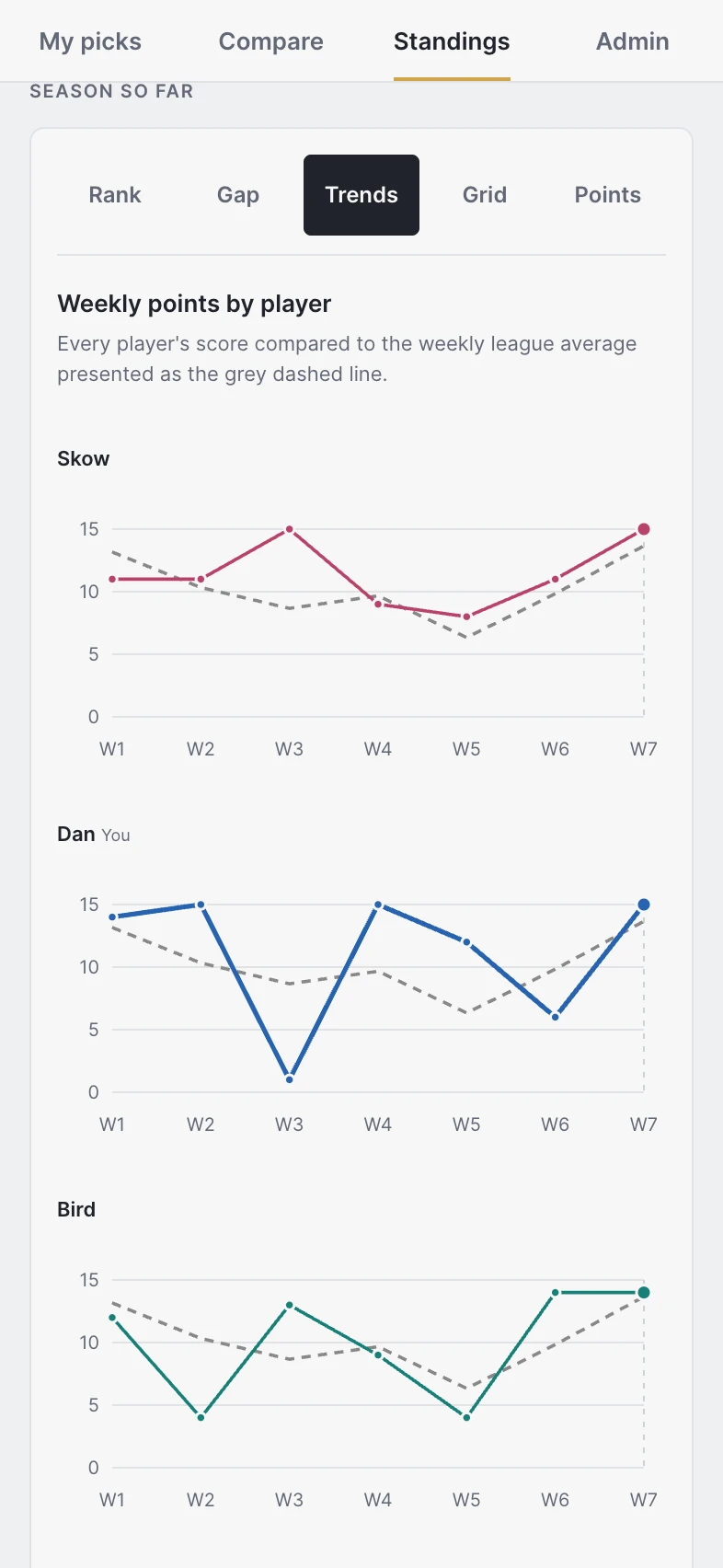
Rank, Gap, and Trends in light mode, refreshed October 18, 2026 with Hide melons enabled.
Track the league across every season
All Time brings the league’s history into one standings view. Compare cumulative points, records, win rates, Hammers, and Sweeps, and see how many times each player finished first or last in completed seasons. Tied finishes count for each player. All Time sits at the top of the season menu, while opening Standings still starts with the current season.
Explore the season
Standings now offers Rank, Gap, Trends, Grid, and Points views. Follow your position, see how far you are from the leader, or compare your performance week by week. Trends and Grid include the weekly league average, helping you put a strong week or a rough stretch in context.
Recognize a perfect week
Sweeps recognize completed 5–0 weeks in Standings. Alongside points and Hammers, they give the league another way to see who has put together a perfect slate.
Keep league access controlled
Access and pick protections received a broader security review and stronger enforcement, supporting the league’s expectation that membership is controlled and picks stay private until kickoff.
Improvements
Compare weekly scores with the league average in Trends and Grid.
Inspect the relevant score, rank, or gap in each chart’s tooltip.
Fixes
Hammer rates now include missed picks that consume the 5-point confidence number. Those picks count as hammer losses at kickoff, keeping your season summary, season standings, and All Time standings consistent with your record. Voided games remain excluded.
Follow every player through the season
See the numbers behind the race
The standings chart became easier to follow as the season progressed. Each player kept a consistent color, so a line could be recognized across weeks, and weekly score tooltips let players inspect the numbers behind a rise or fall in the standings.
League history and game-day progress
Revisit past seasons
The league’s 2019–2025 history joined the app, giving players access to past seasons alongside the current race. Standings movement was tied to weekly results so players could understand how their position changed, and the season summary adjusted as games finished.
Know where your picks stand
Picking and comparing became easier on game day. Players could see which games still needed a pick, whether their weekly slate was complete, and which games were live. Compare made submission status, results, and confidence totals easier to scan, while player pages offered a clearer view of each week’s games.
A smoother week for commissioners
Page loading was streamlined across the app, including the commissioner’s schedule view. Commissioners gained another way to connect existing league records to member accounts, and the super admin could choose whether to show the league’s melon markers.
Improvements
Open any player’s weekly games from Standings.
See a checkmark when all five weekly picks are complete.
Fixes
Standings movement reflects weekly results.
Season points summaries update as games finish.
Introducing Bugsys
Make your weekly picks
The first version brought the weekly pool into one place, initially as 818 Pick Pool and then as Bugsys. Players could sign in with Google, choose winners for five college football games, and assign confidence points from 1 through 5. Picks locked game by game at kickoff, and automatic grading updated scores as results arrived.
Follow the whole league
Compare let the league see everyone’s revealed picks, and standings showed who was ahead. Personal season summaries and a season chart gave players a way to follow their own results and the wider race. The compact interface, phone navigation, and highlighted personal rows made the app easier to use throughout the week.
Run the pool in one place
Commissioners could build and publish slates, sort the schedule by kickoff or spread, manage missed picks, void or swap games, and correct results or points with an audit trail. Admin-approved membership and account linking brought the existing league into the app, while editable display names let players choose how they appeared.
Improvements
Choose your display name on your profile.
Read kickoff times in your local time zone.
Use a compact navigation bar on your phone.
Fixes
Player links in Standings work reliably in Safari.
Weekly history begins Sep 12, 2026. Weeks run Monday through Sunday. Historical dates follow commits on main in Eastern time.